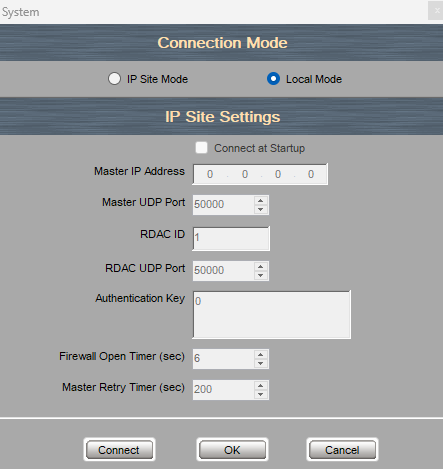
This software enables you to Monitor one Motorola repeater network. For instance if you connect to the master repeater it will show the other Peer repeaters connected on that network. The RDAC software allows you to control a particular repeater, change channels, change power level, enable or disable repeat mode.
It has a clear display for any issues your repeater may have e.g. Fan Problem, VSWR errors by dispalying a easy to see table.
If you wish to monitor multiple Motorola Networks you require additional software licence which allows you to monitor upto 8 seperate networks. Click Here
Version
Notes
25.3 (Build 3)
Support for repeater diagnostics and controls for IP Site Connect features.
For Motorola Repeater Radios including the DR3000, MTR Repeaters and SLR Repeaters.
This software will only work with Windows Computers using windows 10/11 Any Problems please use Windows 7 Compatiability mode.
Please note No Refunds are offered on this product as it is downloadable at point of sale.
***This product is excluded from our Money Back Guarantee***
This Motorola Radio Software is designed to be used on the following radios and software:
Motorola DR3000
Motorola MTR3000
Motorola SLR5500
Motorola SLR8000
Motorola SLR1000
Installation of RDAC - Video
Installation of Motorola Repeater Diagnostics And Control (RDAC) application
Download via the link provided when purchased
Unzip file and click install
Follow the onscreen installation steps
Make sure window updates are enabled incase you require any additonal drivers
Install Net Framework, Radio Drivers and Visual C++ from the folder if you dont already have them installed on your computer
This is for single repeater network
For muliple repeater networks you can purchase Multiple Rdac Systems - HKVN4041A Licence Key from the drop down which enables you to control upto 8 networks, the key is ordered direct from Motorola and can take 24-48 hours. You will still have access to the single repeater network software which you await the key.
Open software
Enter the settings for your master repeater (they can be found on the codeplug for you master repeater under the link establishment tab
Make sure the Master IP, UDP ports are the same as what you enter on the RDAC software.
Make sure any authenication Key is entered
Make sure your Firewall can access the repeater
If it is all correct when you press connect and your master repeater will show up and the peer repeaters will display after a few minutes.
Click the Help → Register Feature in the RDAC application. During registration, an external Internet connection is required. Enter the EID. After registration is complete, the selected feature is available in the application. Selects the feature you want to download to the PC.
Disclaimer:
Administration fee - Please note you are paying for access to the storage of the software on our online portal andnot the software itself. As you can imagine it cost to host large files online which are easily accessible to our customers. The price is normally in reflection to the size of the downloadable file and the storage it takes up. Once Payment has been received and processed through our fraud detection system you will receive a link which will enable you to download the software from our portal. All software rights remain that of the manufacturer and you will not own this software at any point. You are free to use the software for its necessary purpose, but any misuse could make you liable by the software manufacturer.
We do not offer any support or refunds on software purchasesplease read all the information above carefully before you purchase. If you are in any doubt we can create a codeplug for you please just get in touch via email sales@radio-shop.uk and subject title CODEPLUG and we can discuss the price for this service. Please remember to include the make, model and channel requirements.